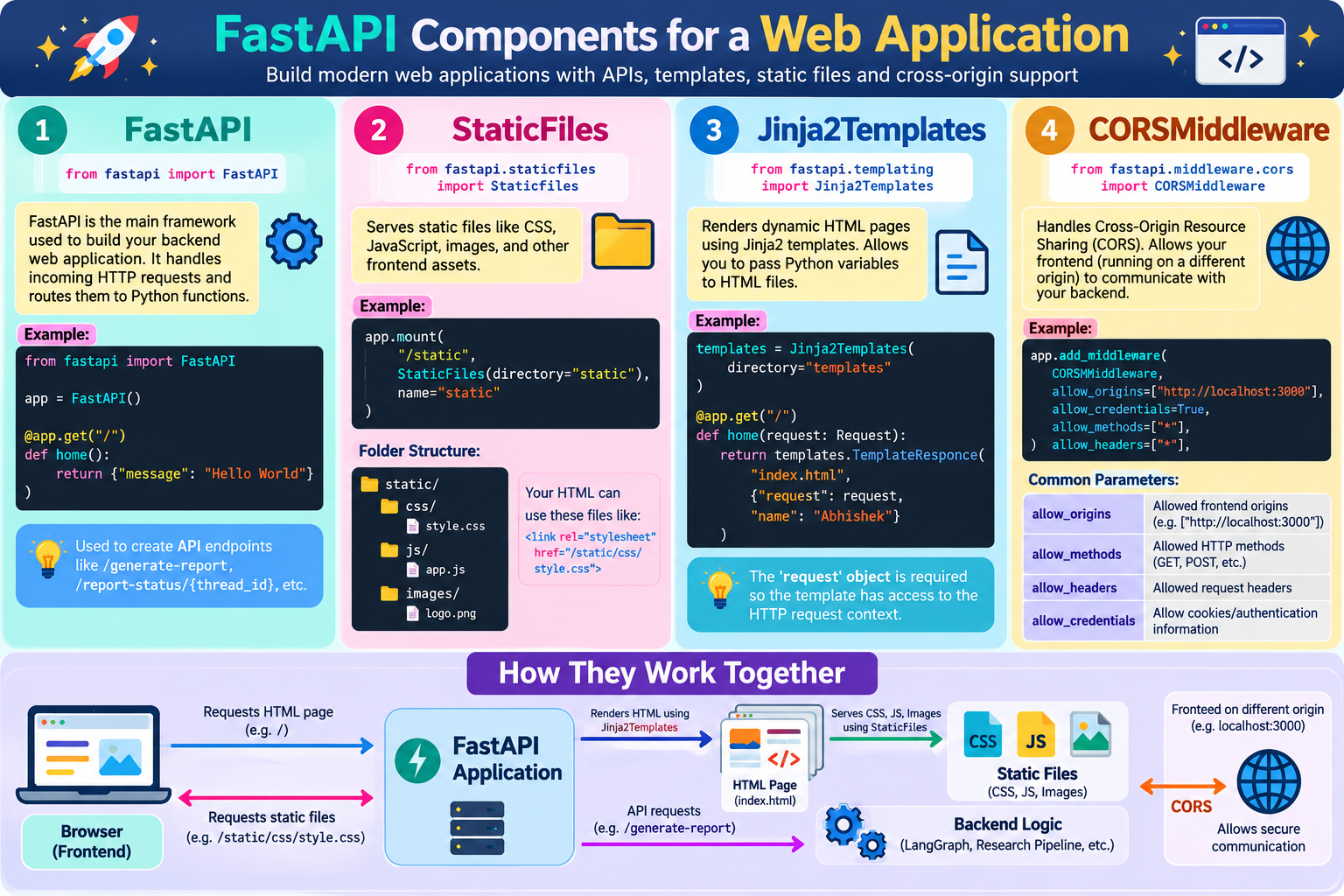
Dependecies
Absolutely. These four imports are commonly used when you are building a FastAPI web application that has a frontend (HTML/CSS/JS) as well as backend APIs.
Think of your application like a restaurant:
                 FastAPI Application
                        │
        ┌───────────────┼────────────────┐
        │               │                │
        ▼               ▼                ▼
   FastAPI          Templates          Static Files
   (Backend)        (HTML pages)       (CSS/JS/images)
        │
        ▼
      CORS
 (Allows frontend ↔ backend communication)
Let's understand each one.
from fastapi import FastAPIfrom fastapi import FastAPIFastAPI?FastAPI is the main framework/application object used to build your backend web application.
You normally start your application with:
from fastapi import FastAPIapp = FastAPI()Here:
app = FastAPI()creates your FastAPI application.
Think of app as the main control center of your backend.
app do?You use it to define API routes.
For example:
@app.get("/")def home(): return {"message": "Hello World"}This creates:
GET /When someone visits:
http://localhost:8000/FastAPI executes:
home()and returns:
{
    "message": "Hello World"
}You might eventually have:
@app.post("/generate-report")def generate_report(request: ReportRequest): ...and:
@app.get("/report-status/{thread_id}")def report_status(thread_id: str): ...and:
@app.get("/download/{file_name}")def download(file_name: str): ...So FastAPI provides the HTTP interface to your LangGraph application.
from fastapi.staticfiles import StaticFilesfrom fastapi.staticfiles import StaticFilesThis is used to serve static files.
Files that don't need Python/AI processing.
For example:
static/
├── css/
│   └── style.css
├── js/
│   └── app.js
├── images/
│   └── logo.png
└── favicon.ico
These are called static files.
StaticFiles?Suppose your HTML contains:
<link rel="stylesheet" href="/static/css/style.css">The browser asks your FastAPI application:
Give me:
/static/css/style.css
You can configure FastAPI:
app.mount( "/static", StaticFiles(directory="static"), name="static")Now FastAPI understands:
/static/...
       ↓
static/...
So:
Browser
   │
   │ GET /static/css/style.css
   ▼
FastAPI
   │
   ▼
StaticFiles
   │
   ▼
static/css/style.css
   │
   ▼
BrowserProject:
project/
│
├── main.py
│
├── templates/
│   └── index.html
│
└── static/
    ├── css/
    │   └── style.css
    └── js/
        └── app.js
FastAPI:
app.mount( "/static", StaticFiles(directory="static"), name="static")HTML:
<link rel="stylesheet" href="/static/css/style.css">

<script src="/static/js/app.js"></script>
FastAPI now serves those files.
from fastapi.templating import Jinja2Templatesfrom fastapi.templating import Jinja2TemplatesThis is used to render HTML templates dynamically.
This is different from StaticFiles.
Serves:
CSS
JavaScript
ImagesGenerates:
Dynamic HTML pagesJinja2 is a template engine.
It allows you to put variables inside HTML.
For example:
<h1>Hello {{ name }}</h1>Here:
{{ name }}is a Jinja2 variable.
Python can provide the value:
name = "Abhishek"and the browser receives:
<h1>Hello Abhishek</h1>Suppose:
project/
│
├── main.py
│
└── templates/
└── index.htmlindex.html:
<!DOCTYPE html>
<html>
<head>
    <title>Research Assistant</title>
</head>

<body>

<h1>Welcome {{ name }}</h1>

</body>
</html>
In Python:
templates = Jinja2Templates(directory="templates")Then:
from fastapi import Request@app.get("/")def home(request: Request): return templates.TemplateResponse( "index.html", { "request": request, "name": "Abhishek" } )The browser receives:
<h1>Welcome Abhishek</h1>request passed?You'll often see:
{ "request": request, "name": "Abhishek"}The request object is required by FastAPI's TemplateResponse mechanism so the template has access to the current HTTP request context.
So don't think:
request = something displayed to userInstead:
request
   ↓
current HTTP request/context
   ↓
Jinja2 template renderingfrom fastapi.middleware.cors import CORSMiddlewareThis one is extremely important when your frontend and backend are running on different origins.
from fastapi.middleware.cors import CORSMiddlewareCORS means:
Cross-Origin Resource Sharing
Suppose your FastAPI backend runs here:
http://localhost:8000But your frontend runs here:
http://localhost:3000These are different origins.
Frontend
localhost:3000
       │
       │ API request
       ▼
Backend
localhost:8000
The browser applies security rules to cross-origin requests.
CORS tells the backend:
"I allow requests coming from this frontend."
You can configure:
app.add_middleware( CORSMiddleware, allow_origins=["http://localhost:3000"], allow_credentials=True, allow_methods=["*"], allow_headers=["*"],)This means:
allow_originsallow_origins=["http://localhost:3000"]Allow this frontend to communicate with your backend.
allow_methodsallow_methods=["*"]Allow HTTP methods such as:
GET
POST
PUT
DELETE
PATCHallow_headersallow_headers=["*"]Allow requested HTTP headers.
allow_credentialsallow_credentials=TrueAllows credentials such as cookies/authentication information when configured appropriately.
Imagine you have:
React Frontend
localhost:3000
       │
       │
       │ POST /generate-report
       ▼
FastAPI
localhost:8000
       │
       ▼
LangGraph
       │
       ▼
Research Pipeline
Your frontend might send:
fetch("http://localhost:8000/generate-report", {
    method: "POST",
    ...
})
Because:
localhost:3000and:
localhost:8000are different origins, CORS configuration may be needed.
This is the most important part.
| Import | Main job | Simple meaning |
|---|---|---|
FastAPI | Creates backend application | Build the backend |
StaticFiles | Serves CSS/JS/images | Serve frontend files |
Jinja2Templates | Generates dynamic HTML | Create HTML pages dynamically |
CORSMiddleware | Controls cross-origin access | Allow frontend ↔ backend communication |
Suppose your project looks like:
multiagent-research-report/
│
├── main.py
│
├── templates/
│   └── index.html
│
├── static/
│   ├── css/
│   │   └── style.css
│   └── js/
│       └── app.js
│
└── src/
    └── research_automation/
        └── workflow/
            └── autonomous_reports.py
Your FastAPI setup could look like:
from fastapi import FastAPI, Requestfrom fastapi.staticfiles import StaticFilesfrom fastapi.templating import Jinja2Templatesfrom fastapi.middleware.cors import CORSMiddlewareapp = FastAPI()# 1. Allow frontend/backend communicationapp.add_middleware( CORSMiddleware, allow_origins=["*"], allow_credentials=True, allow_methods=["*"], allow_headers=["*"],)# 2. Serve CSS, JS and imagesapp.mount( "/static", StaticFiles(directory="static"), name="static")# 3. Configure HTML templatestemplates = Jinja2Templates(directory="templates")# 4. Display HTML page@app.get("/")def home(request: Request): return templates.TemplateResponse(The overall architecture becomes:
                    Browser
                       │
                       │
              ┌────────┴────────┐
              │                 │
              ▼                 ▼
          HTML Page        API Request
              │                 │
              ▼                 ▼
      Jinja2Templates        CORS
              │                 │
              ▼                 ▼
          FastAPI Application
                  │
                  ▼
             LangGraph
                  │
                  ▼
          Research Pipeline
                  │
                  ▼
          Final Research Report


StaticFiles
     │
     ├── CSS
     ├── JavaScript
└── ImagesRemember these four as:
FastAPI = Backend
StaticFiles = CSS/JS/images
Jinja2Templates = HTML pages
CORSMiddleware = Frontend-backend permission
And importantly, Jinja2Templates and StaticFiles are not the same thing: Jinja2 produces the HTML page, while StaticFiles delivers the supporting files (CSS, JavaScript, images) that the HTML page references.
 Continue With Google
 Programming