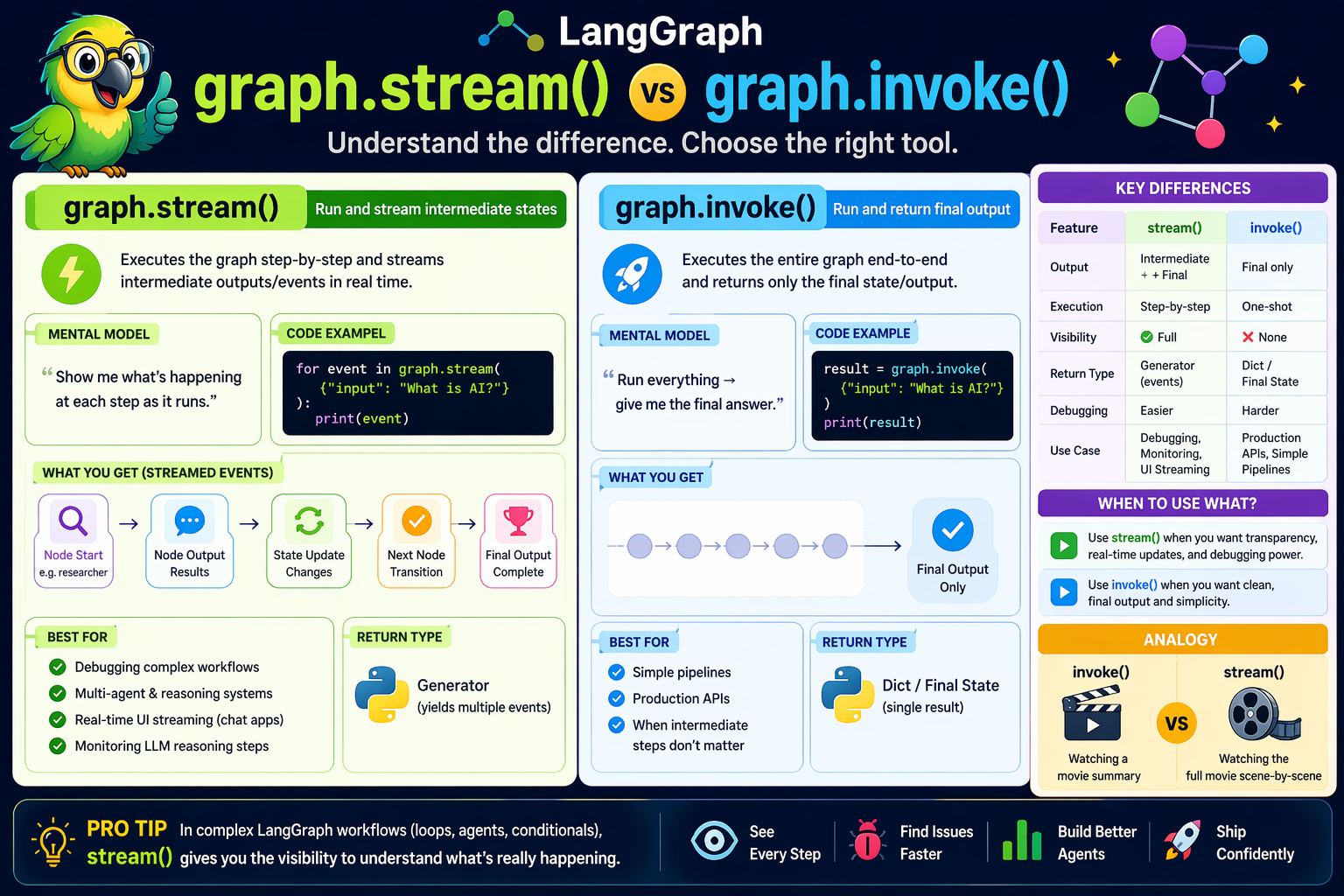
In LangGraph, both graph.invoke() and graph.stream() are used to execute a graph—but they differ fundamentally in how results are returned and observed.
graph.invoke() — Run and return final outputExecutes the entire graph end-to-end
Returns only the final state/output
No visibility into intermediate steps
“Run everything → give me the final answer.”
result = graph.invoke({"input": "What is AI?"})
print(result)
Blocking call (waits until full execution completes)
You don’t see node-by-node execution
Best for:
Simple pipelines
Production APIs
When intermediate steps don’t matter
graph.stream() — Run and stream intermediate statesExecutes the graph step-by-step
Streams intermediate outputs/events
You can observe each node execution in real time
“Show me what’s happening at each step as it runs.”
for event in graph.stream({"input": "What is AI?"}):
    print(event)
Generator-based (yields multiple outputs)
You can see:
Node outputs
State updates
Transitions between nodes
Useful for:
Debugging workflows
Multi-agent systems
Monitoring LLM reasoning
UI streaming (like chat apps)
| Feature | invoke() | stream() |
|---|---|---|
| Output | Final result only | Intermediate + final |
| Execution | One-shot | Step-by-step |
| Visibility | ❌ None | ✅ Full |
| Return type | Dict / final state | Generator (events) |
| Debugging | Harder | Easier |
| Use case | Production calls | Debugging, UI streaming |
When using stream(), you typically receive events like:
{
  "node": "researcher",
  "output": {...},
  "state": {...}
}
Depending on configuration (stream_mode), you can stream:
"values" → full state
"updates" → only changes
"messages" → LLM messages (chat-style)
invoke() when:You want clean, final output
You're building APIs or backend logic
Performance simplicity matters
stream() when:You want transparency
You are building:
AI agents
Multi-step reasoning systems
Real-time UI (chat streaming)
You need debugging visibility
In complex workflows (like your analyst system 👇):
invoke() hides how analysts are created
stream() shows:
when each analyst is generated
how feedback loops affect flow
conditional routing (should_continue)
👉 So for LangGraph + LLM orchestration, stream() is often the real power tool
invoke() = Watching a movie summary
stream() = Watching the full movie scene-by-scene
 Continue With Google
  Programming
 AI: Artificial intelligence

