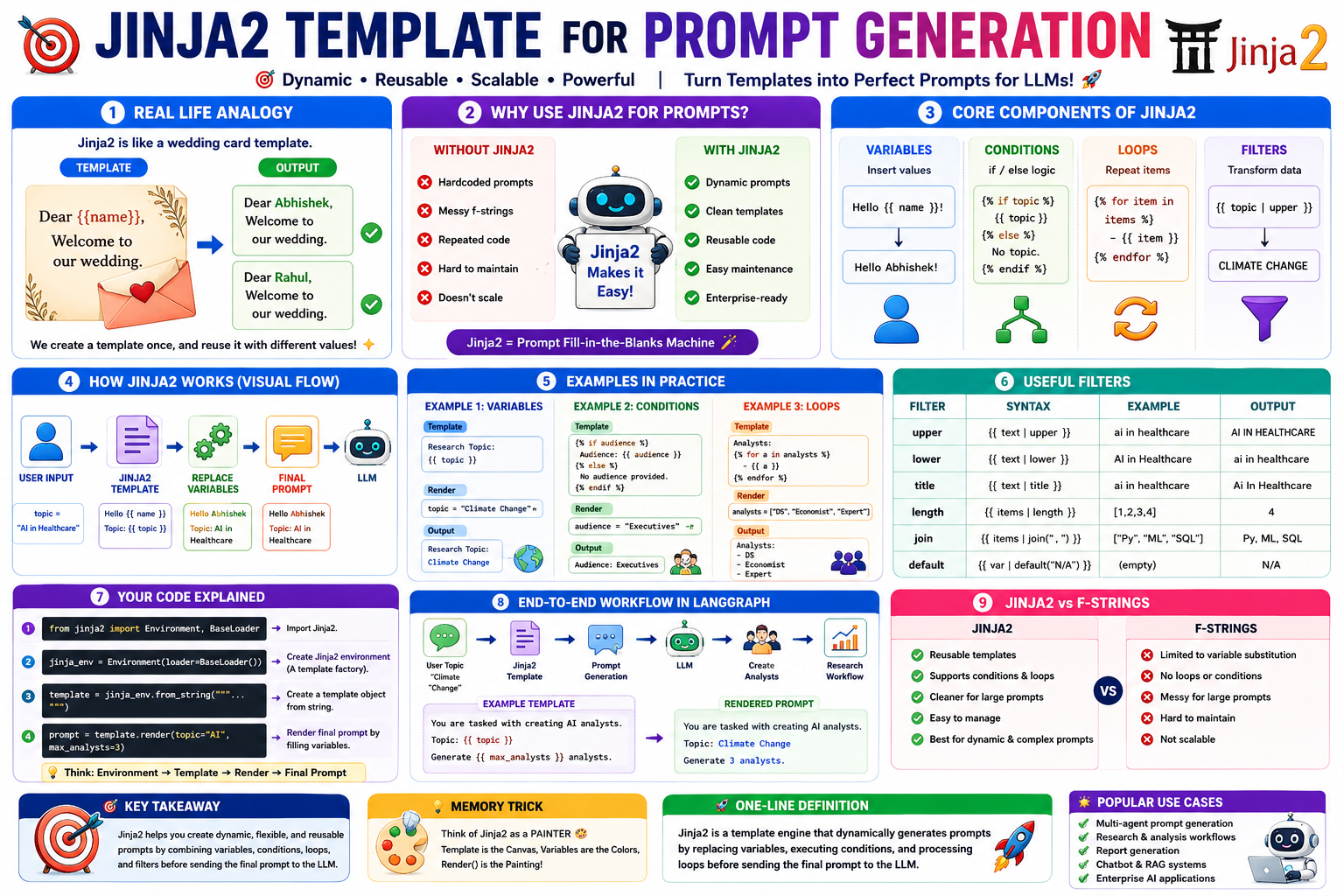
If you've worked with LangGraph, LangChain, CrewAI, Multi-Agent Systems, or AI Research Agents, you'll often see something like:
from jinja2 import Environment, BaseLoader

jinja_env = Environment(loader=BaseLoader())

prompt = jinja_env.from_string("""
You are an expert researcher.

Research Topic:
{{ topic }}

Audience:
{{ audience }}
""")
Many beginners think:
🤔 "Is Jinja2 part of AI?"
No.
Jinja2 is simply a template engine that helps generate prompts dynamically.
Imagine you're a wedding card printer.
Instead of writing:
Dear Abhishek,
Welcome to our wedding.
again and again,
you create a template:
Dear {{name}},
Welcome to our wedding.
Now:
template.render(name="Abhishek")
becomes
Dear Abhishek,
Welcome to our wedding.
And:
template.render(name="Rahul")
becomes
Dear Rahul,
Welcome to our wedding.
Without Jinja2:
topic="Artificial Intelligence"

prompt=f"""
You are a researcher.

Research topic:
{topic}
"""
Works fine...
But becomes messy when prompts become huge.
Imagine a 300-line prompt.
Without Jinja2:
prompt = f"""
You are researcher.

Topic: {topic}

Audience: {audience}

Goal: {goal}

Output format: {format}
"""
Hard to maintain.
With Jinja2:
template = """
You are researcher.

Topic:
{{topic}}

Audience:
{{audience}}

Goal:
{{goal}}
"""
Cleaner.
Professional.
Easy to edit.
                    User Input
                          │
                          ▼
                topic="AI in Healthcare"
                          │
                          ▼
                  Jinja2 Template
                          │
                          ▼
                Replace Variables
                          │
                          ▼
                  Final Prompt
                          │
                          ▼
                         LLM
Think of Jinja2 as a toolkit.
Most common feature.
Research Topic:
{{ topic }}
template.render(
    topic="Climate Change"
)
Output:
Research Topic:
Climate Change
{{topic}}
    │
    ▼
Climate Change
Super important in prompt engineering.
{% if topic %}
Research Topic:
{{topic}}
{% else %}
No topic provided.
{% endif %}
template.render(
    topic="AI"
)
Output:
Research Topic:
AI
template.render(
    topic=""
)
Output:
No topic provided.
              Is topic present?
                      │
          ┌───────────┴───────────┐
          │                       │
         YES                     NO
          │                       │
          ▼                       ▼
 Show Topic            Show Default Message
Used heavily in LangGraph.
Imagine:
analysts = [
    "Data Scientist",
    "Economist",
    "Climate Expert"
]
Template:
Available Analysts:

{% for analyst in analysts %}
- {{ analyst }}
{% endfor %}
Output:
Available Analysts:

- Data Scientist
- Economist
- Climate Expert
Analysts List
      │
      ▼
┌─────────────┐
│ Scientist   │
│ Economist   │
│ Expert      │
└─────────────┘
      │
      ▼
Generate Bullet List
Multi-Agent systems often create:
[
 Analyst1,
 Analyst2,
 Analyst3,
 Analyst4
]
Jinja2 automatically renders them.
Filters transform data.
Syntax:
{{ variable | filter }}
{{ topic | upper }}
Input:
topic="artificial intelligence"
Output:
ARTIFICIAL INTELLIGENCE
Common Filters
| Filter | Result |
|---|---|
| upper | ABC |
| lower | abc |
| title | Artificial Intelligence |
| length | Count |
| join | Combine list |
Example
{{ skills | join(", ") }}
Input:
["Python","SQL","ML"]
Output:
Python, SQL, ML
You showed:
{% if topic %}
{{topic}}
{% else %}
[No topic provided]
{% endif %}
Let's decode it.
Check if topic exists.
Is topic available?
If yes
Display topic
If no
Display default text
Visual:
           topic ?
              │
       ┌──────┴──────┐
       │             │
      Yes            No
       │             │
       ▼             ▼
 {{topic}}    [No topic provided]
Suppose we are creating AI analysts.
Input:
topic="Climate Change"
max_analysts=3
You are tasked with creating AI analysts.

Topic:
{{topic}}

Generate {{max_analysts}} analysts.
You are tasked with creating AI analysts.

Topic:
Climate Change

Generate 3 analysts.
User Topic
     │
     ▼
Climate Change
     │
     ▼
Jinja2 Template
     │
     ▼
Prompt Generation
     │
     ▼
LLM
     │
     ▼
Create Analysts
     │
     ▼
Research Workflow
from jinja2 import Environment, BaseLoader
Imports Jinja2.
jinja_env = Environment(
    loader=BaseLoader()
)
Creates a Jinja environment.
Think:
Environment
     │
     ▼
Template Factory
create_analyst_prompt = jinja_env.from_string("""
...
""")
Creates a template object.
prompt = create_analyst_prompt.render(
    topic="Generative AI",
    max_analysts=5
)
Renders final prompt.
You are an AI researcher.

Topic:
{{topic}}

{% if audience %}
Audience:
{{audience}}
{% endif %}

Generate insights.
render(
    topic="AI in Banking",
    audience="Executives"
)
You are an AI researcher.

Topic:
AI in Banking

Audience:
Executives

Generate insights.
| Without Jinja2 | With Jinja2 |
|---|---|
| Hardcoded prompts | Dynamic prompts |
| Repeated code | Reusable templates |
| Difficult maintenance | Easy maintenance |
| Poor scalability | Enterprise-ready |
| Messy f-strings | Clean prompt architecture |
Think of Jinja2 as:
🎭 Prompt Fill-in-the-Blanks Machine
Template
      │
      ▼
Fill Variables
      │
      ▼
Final Prompt
      │
      ▼
LLM
Jinja2 is a template engine that dynamically generates prompts by replacing variables, executing conditions, and processing loops before sending the final prompt to the LLM.
This is why frameworks like LangGraph, LangChain, and many enterprise AI systems use Jinja2 to build flexible, reusable, and scalable prompt-generation pipelines.
 Continue With Google
  Data Science
 AI: Artificial intelligence

