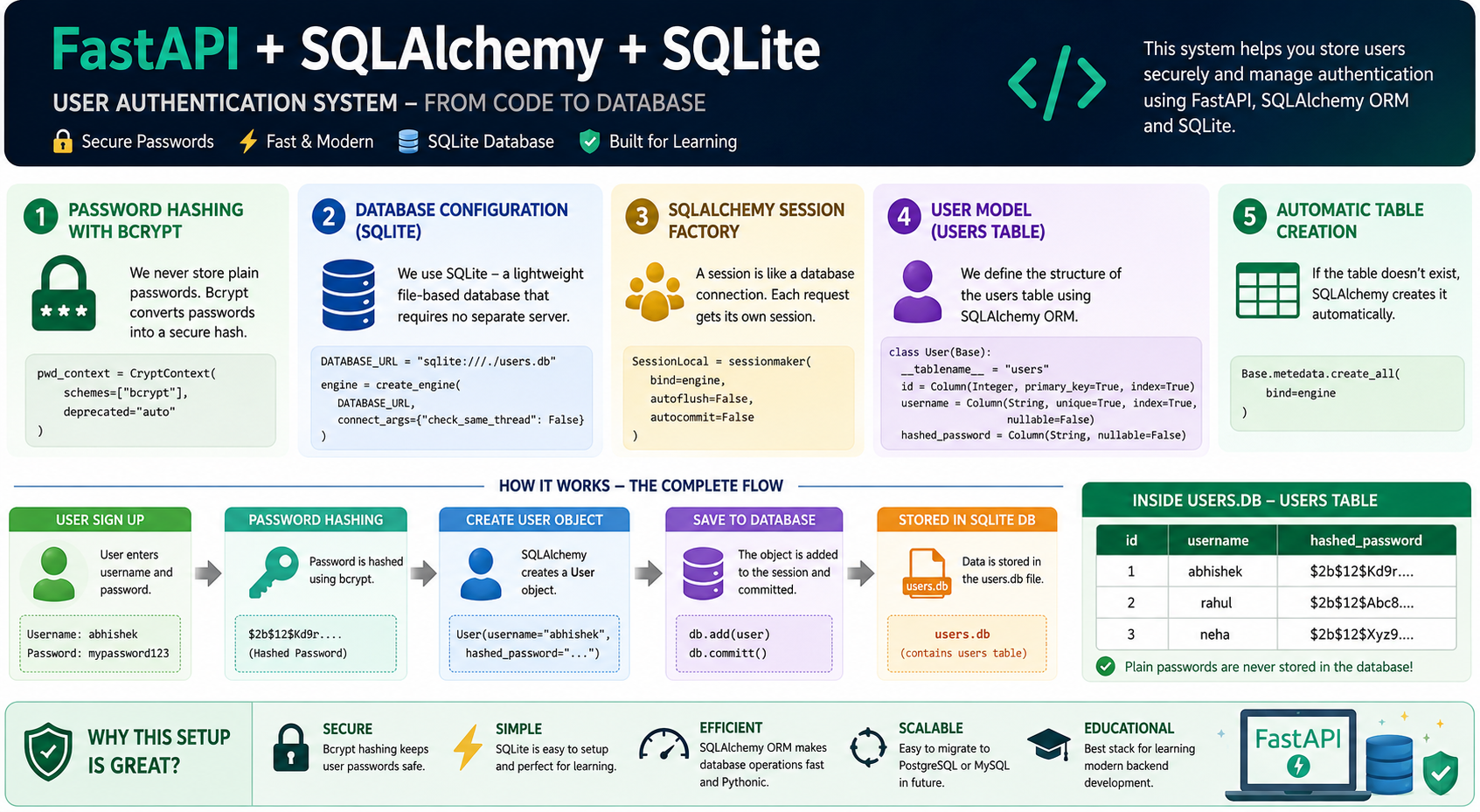
This file is the foundation of your authentication system. It performs four main jobs:
Configures password hashing.
Connects to the database.
Defines the database table.
Creates the table if it doesn't exist.
Let's understand it conceptually, from the ground up.
                User Signs Up
                      │
                      ▼
            Hash Password (bcrypt)
                      │
                      ▼
              SQLAlchemy ORM
                      │
                      ▼
            SQLite Database Engine
                      │
                      ▼
                  users.db
                      │
                      ▼
                 users Table
Everything in this file is preparing this pipeline.
from sqlalchemy import create_engine, Column, String, Integer
from sqlalchemy.orm import declarative_base, sessionmaker
from passlib.context import CryptContext
These libraries have different responsibilities.
Think of SQLAlchemy as a translator.
Instead of writing SQL like:
SELECT * FROM users;
you write Python:
db.query(User)
SQLAlchemy converts Python into SQL.
Passlib is responsible for password security.
Instead of storing:
mypassword123
it stores:
$2b$12$eLMF....
So even if someone steals your database, they cannot immediately read users' passwords.
pwd_context = CryptContext(
    schemes=["bcrypt"],
    deprecated="auto"
)
Imagine you hire a security expert.
You tell him:
"Whenever someone gives me a password, lock it using bcrypt."
That's exactly what this configuration does.
Because bcrypt is specifically designed for passwords.
Features:
Slow (hard for hackers to brute-force)
Salt is automatically added
One-way hashing
Industry standard
DATABASE_URL = "sqlite:///./users.db"
This tells SQLAlchemy:
"Our database is stored in a file called users.db."
Breaking it apart:
sqlite:///
means
Use SQLite.
./
means
Current project folder.
users.db
means
Database filename.
If your project is:
project/
│
├── main.py
├── db_config.py
After running:
project/
│
├── main.py
├── db_config.py
├── users.db
engine = create_engine(
    DATABASE_URL,
    connect_args={"check_same_thread": False}
)
This creates the engine.
Think of the engine as the driver of a car.
FastAPI
    │
    ▼
SQLAlchemy
    │
    ▼
Engine
    │
    ▼
SQLite Database
Without the engine,
Python cannot communicate with SQLite.
check_same_thread=False?SQLite normally allows only one thread to use the database connection.
FastAPI serves many users simultaneously.
So we allow SQLAlchemy to manage connections across requests safely.
SessionLocal = sessionmaker(
    bind=engine,
    autoflush=False,
    autocommit=False
)
This is one of the most important concepts.
Imagine the database is a bank.
Every customer gets a token to interact with the bank.
That token is called a Session.
Database

      ▲
      │
Session
Whenever you need the database:
db = SessionLocal()
you receive a brand-new session.
The engine is like the bank building.
The session is like your bank counter.
Each user/request gets their own counter.
Base = declarative_base()
This creates the parent class for all database models.
Think of it as saying:
"Every class that inherits from Base becomes a database table."
Without Base:
class User:
is just a normal Python class.
With Base:
class User(Base):
SQLAlchemy knows:
This represents a database table.
class User(Base):
This is called an ORM Model.
It represents one table inside the database.
__tablename__ = "users"
Database:
users
table.
id = Column(
    Integer,
    primary_key=True,
    index=True
)
Database:
| id |
|---|
| 1 |
| 2 |
| 3 |
Every user gets a unique ID.
username = Column(
    String,
    unique=True,
    index=True,
    nullable=False
)
Meaning:
Text.
No duplicates.
Allowed:
abhishek
rahul
Not allowed:
abhishek
abhishek
Creates an index.
Imagine a book.
Without index:
Page 1
Page 2
Page 3
...
Page 500
Need to search every page.
With index:
A
Abhishek → Page 120
Searching becomes much faster.
Cannot be empty.
Not allowed:
username = NULL
hashed_password = Column(
    String,
    nullable=False
)
Notice:
Not
password
Instead:
hashed_password
This reminds everyone:
We never store plain passwords.
Base.metadata.create_all(bind=engine)
This checks:
Does users table exist?
If yes:
Do nothing.
If no:
Create it.
Equivalent SQL:
CREATE TABLE users (
    id INTEGER PRIMARY KEY,
    username VARCHAR UNIQUE,
    hashed_password VARCHAR
);
Suppose user signs up.
Username

abhishek

Password

mypassword123
Password becomes
$2b$12$Kd9r....
Database:
| id | username | hashed_password |
|---|---|---|
| 1 | abhishek | $2b$12$Kd9r.... |
Notice:
The original password never enters the database.
User
 │
 │ Signup
 ▼
Enter Username + Password
 │
 ▼
hash_password()
 │
 ▼
bcrypt Hash
 │
 ▼
User Object
 │
 ▼
SQLAlchemy ORM
 │
 ▼
Engine
 │
 ▼
users.db
 │
 ▼
users Table
 │
 ├── id
 ├── username
 └── hashed_password
| Component | Purpose |
|---|---|
CryptContext | Defines how passwords are securely hashed and verified. |
DATABASE_URL | Specifies where the database is located. |
engine | Opens and manages the connection between Python and the database. |
SessionLocal | Creates an isolated database session for each request. |
Base | Marks classes as SQLAlchemy ORM models. |
User | Defines the structure of the users table. |
Column | Defines individual fields (columns) of the table. |
create_all() | Automatically creates the table if it doesn't already exist. |
Once you understand this file, you've grasped the core of how FastAPI + SQLAlchemy models, sessions, and database connections work together. The next layer is learning how CRUD operations (Create, Read, Update, Delete) use SessionLocal and the User model to interact with users.db.
 Continue With Google
  Programming