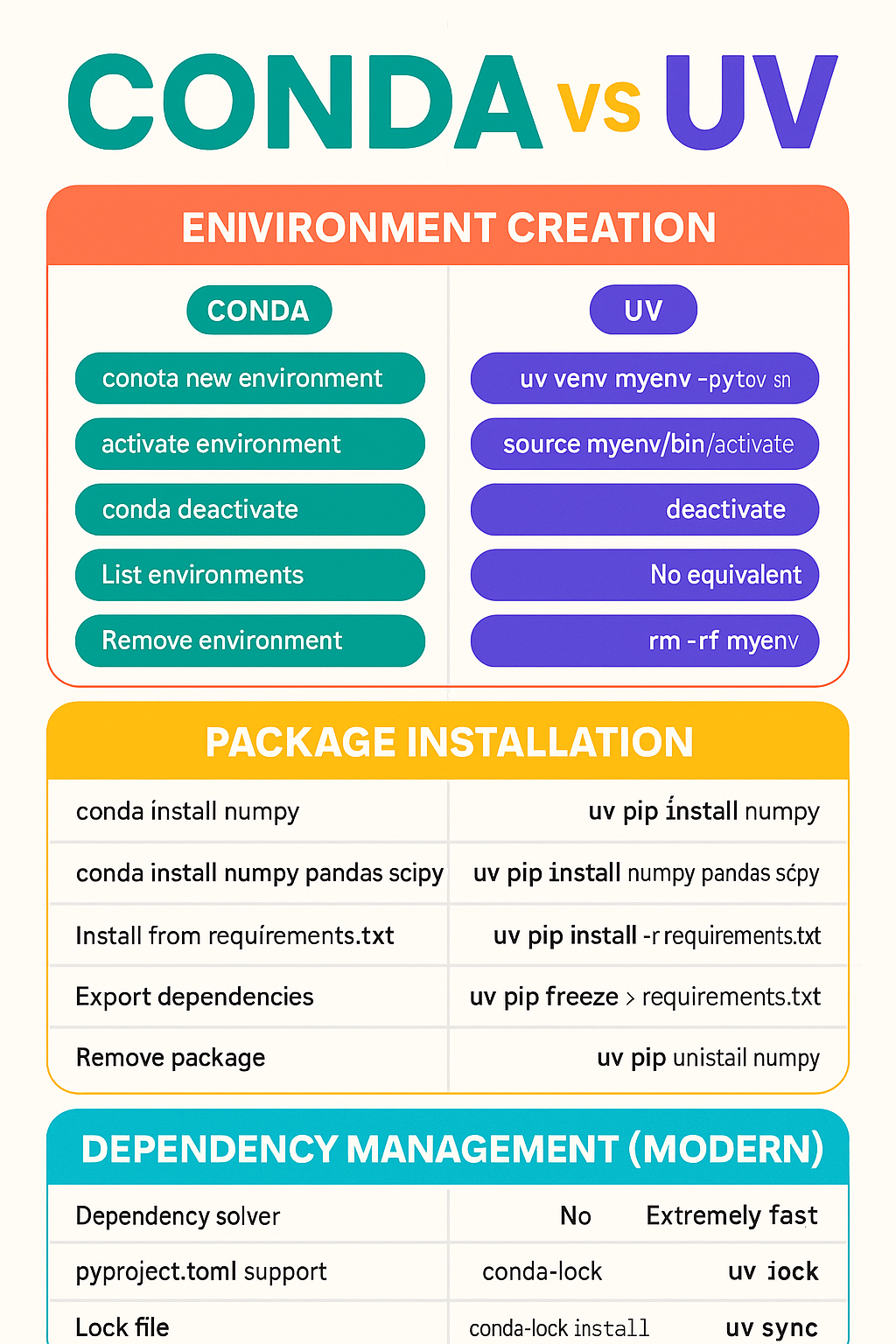
🧠 What They Are
A package manager + environment manager.
Works for Python + system-level packages (C libraries, ML dependencies).
Creates isolated environments with specific Python versions.
Comes with Anaconda or Miniconda distribution.
Slower in solving dependencies but extremely compatible.
A next-gen ultra-fast Python package manager by Astral.
Replaces pip, virtualenv, pip-tools, pyenv, poetry concepts in one tool.
Extremely fast (10–100x faster) than pip/conda.
Uses pyproject.toml for modern dependency management.
Best for lightweight, modern, fast development workflows.
| Task | 🐍 Conda Command | ⚡ UV Command |
|---|---|---|
| Create new environment | conda create -n myenv python=3.10 |
uv venv myenv --python 3.10 |
| Activate environment | conda activate myenv |
source myenv/bin/activate (Linux/Mac) or myenv\Scripts\activate (Windows) |
| Deactivate environment | conda deactivate |
deactivate |
| List environments | conda env list |
No global listing (UV creates folder-based envs) |
| Remove environment | conda remove -n myenv --all |
Just delete the folder → rm -rf myenv |
| Task | 🐍 Conda | ⚡ UV |
|---|---|---|
| Install a package | conda install numpy |
uv pip install numpy |
| Install multiple packages | conda install numpy pandas scipy |
uv pip install numpy pandas scipy |
Install from requirements.txt |
conda install --file requirements.txt |
uv pip install -r requirements.txt |
| Export dependencies | conda list --export > req.txt |
uv pip freeze > requirements.txt |
| Remove package | conda remove numpy |
uv pip uninstall numpy |
| Feature | 🐍 Conda | ⚡ UV |
|---|---|---|
| Dependency solver | Slow but stable | ⚡ Extremely fast |
| pyproject.toml support | ❌ No | ✅ Yes |
| Lock file | conda-lock (external) |
Built-in: uv lock |
| Install from lock file | conda-lock install |
uv sync |
| Operation | Conda | UV |
|---|---|---|
| Create env | ~5–20 seconds | ⚡ 0.1–0.5 seconds |
| Install packages | Slow (solver heavy) | ⚡ Very fast |
| Sync dependencies | Medium | ⚡ Ultra fast |
You work with ML, Data Science, GPU libraries (TensorFlow, PyTorch, cuDNN).
You need system-level dependencies.
You want environment isolation with full package control.
You want maximum speed.
You work with modern Python packaging.
You don’t need heavy system-level dependencies.
You want a replacement for pip + venv + poetry.
| Operation | Conda | UV |
|---|---|---|
| Create env | conda create -n env python=3.10 |
uv venv env --python 3.10 |
| Activate | conda activate env |
env/Scripts/activate |
| Deactivate | conda deactivate |
deactivate |
| Operation | Conda | UV |
|---|---|---|
| Install | conda install x |
uv pip install x |
| Uninstall | conda remove x |
uv pip uninstall x |
| Install from file | conda install --file req.txt |
uv pip install -r req.txt |
| Operation | Conda | UV |
|---|---|---|
| Init project | — | uv init |
| Create lock file | External | uv lock |
| Sync project | — | uv sync |
| Build wheel | — | uv build |
| Feature | Conda | UV |
|---|---|---|
| Speed | ❌ Slow | ⚡ Fastest |
| ML support | ⭐ Best | ❌ Not ideal |
| Modern packaging | ❌ No | ⭐ Yes |
| Ease of use | Medium | ⭐ Very easy |
| System packages | ⭐ Strong | ❌ Weak |
 Continue With Google
  Programming

